When you pay by card through Xsolla, you may be asked to complete a Card Verification step to confirm that you’re the cardholder.
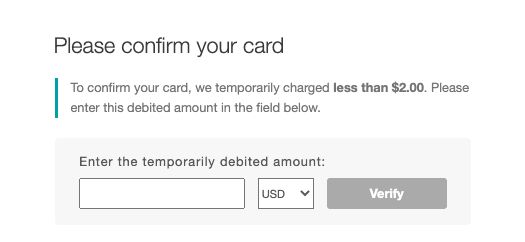
- During this step, Xsolla temporarily holds a small amount, less than $2.00, on your card.
-
Check the exact amount in your bank’s pending or held transactions, or in an SMS message from your bank. If you see several small charges, use the most recent one.
※ Please note that the hold amount is only valid for 3 hours. If it doesn’t appear within that time, we recommend using a different bank card, or contact your bank directly to find out how much the small hold amount is.
- Return to the verification screen, enter that amount, select the currency it was charged in, and click [Verify].
The temporary hold is used only for verification. Please note that it may take some time for it to disappear from your statement, depending on your card issuer.
For more details, please refer to Xsolla – Card Verification.
If verification fails, see “My Xsolla card payment failed. What should I do?”