KYC
KYC Re-Verification

If you have received a KYC re-verification request, you must complete the re-verification process to continue using the MapleStory Universe service with your account.
You can proceed with KYC re-verification by following the steps below:
- Connect your wallet to the MapleStory Universe website — you will be redirected to the re-verification page.
- Click the “Re-Verification” button at the bottom of the re-verification page.
- Complete the re-verification process through FaceAuth.
- Once completed, you can resume using the MapleStory Universe service as normal.
※ You can attempt the re-verification up to three times. After three failed attempts, your KYC re-verification will be considered failed, and your account will be restricted from using MapleStory Universe service.
※ You must complete the re-verification within 14 days from the time you click the “Re-Verification” button. If the 14-day period expires, the KYC re-verification will be considered failed, and your account will be restricted from using MapleStory Universe service.
KYC re-verification was introduced as a means to take additional measures against accounts suspected of using hacks or/and macros.
If you have received a re-verification request, please follow the procedure described in [I received a KYC re-verification request. What should I do?] FAQ to complete the process and resume using the MapleStory Universe service.
If you successfully complete the KYC re-verification, your previous KYC level will be restored, and your MapleStory Universe account will return to its normal state as it was before the re-verification request.
※ If your account was already under service restriction before receiving the KYC re-verification request, the sanction will remain in effect until the original ban end date, even after the re-verification.
If you fail KYC re-verification, your account will be placed under service restriction.
A KYC re-verification failure occurs if any of the following conditions are met:
- You fail the FaceAuth verification three times in total.
- You fail to complete the re-verification within 14 days after clicking the “Re-Verification” button.
KYC Restriction
This FAQ provides a simple overview of why restrictions may occur, how to resolve them, and what to expect.
1) Why are both my MSU account and KYC Level restricted?
- A potential compliance concern was flagged during our standard identity verification process.
- For regulatory reasons, we may not be able to disclose details regarding the concern identified or the precise reason for the restriction.
2) What happens when restrictions are applied?
- Your MSU account and KYC status may be subject to temporary or permanent restrictions.
-
KYC status restrictions may include:
- Wallet-to-Wallet NFT/FT transfers on Henesys L1 restricted
- Daily NXPC & NESO Bridge-Out/Transfer Limit capped at USD1,000
- Credit Level downgraded to 0 or 1
-
KYC status restrictions may include:
-
MSU account restrictions may include:
- Login remains available, but all MSU-related services are restricted
- Restrictions may be temporary or permanent, depending on the outcome of Enhanced Due Diligence (EDD).
3) How can I remove the restriction?
- You will receive an email at the address registered in the verification system within seven (7) days after the restriction is imposed.
- The email will include a link to submit additional documents for EDD.
- Typical documents requested include:
- Government-issued ID or Passport;
- A selfie; and
- Proof of address (e.g., utility bill or bank statement issued within the last three (3) months)
- Please follow the instructions in the email to complete your submission.
4) How long does the review take?
- You must respond within the timeframe specified in the email (usually seven (7) days).
- If no response is received, the restriction may be finalized and made permanent.
- Once documents are submitted, reviews generally take two (2) to three (3) weeks, but may take longer for complex cases.
5) How is my data handled?
- All documents submitted as part of the EDD process are handled by accredited third-party compliance providers.
- They apply industry-standard security measures, including encryption and strict access controls, to safeguard your personal data.
6) Quick answers
I cannot find the email.
Check your spam or promotions folders.
I need more time.
Reply to the email to request an extension. Extensions may be reviewed on a case-by-case basis.
I submitted the requested documents but have not received an update.
Reviews are typically completed within up to twenty (20) business days. If more than twenty (20) business days have passed, please contact support at support-kyc@nexpace.io.
Note: This FAQ is for customer guidance only. Actual enforcement is carried out in accordance with the Terms of Service, our operation policy, and applicable law.
Learn More About KYC
Verifying your ID helps confirm your identity and protect against fraud, financial crimes and money laundering attempts.
Proof of residence ensures compliance with regional laws and regulations.
Together, these steps help create a safer and more secure environment for all Maplers.
KYC (Know Your Customer) is the process of verifying a user’s identity and assessing potential risk before granting access to certain services.
By checking ID documents and proof of residence, KYC helps prevent fraud, money laundering, terrorist financing and other illicit activities.
Verification
If network-related services are running on your mobile device when accessing the KYC verification, the IP address may be blocked from verification for up to 48 hours.
To ensure successful KYC verification on your mobile device, please disable any network-related services before proceeding.
※ The IP address used for KYC verification is determined by the network environment of your mobile device.
KYC verification may be deactivated if abnormal verification activity is detected.
If deactivated, future attempts to reverify may result in failure.
Please refer to the following cases specified in our Terms of Use that may apply. [LINK]
You can complete KYC on the MapleStory Universe web.
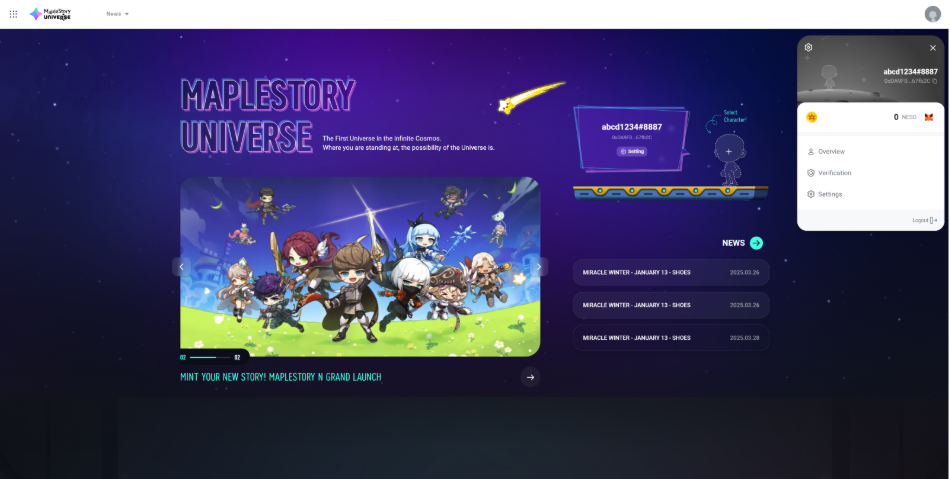
- Go to MapleStory Universe Web and connect your wallet.
- Click the profile button in the top right corner and select Verification.
- Choose the verification level you want to complete, and you will be redirected to the KYC page.
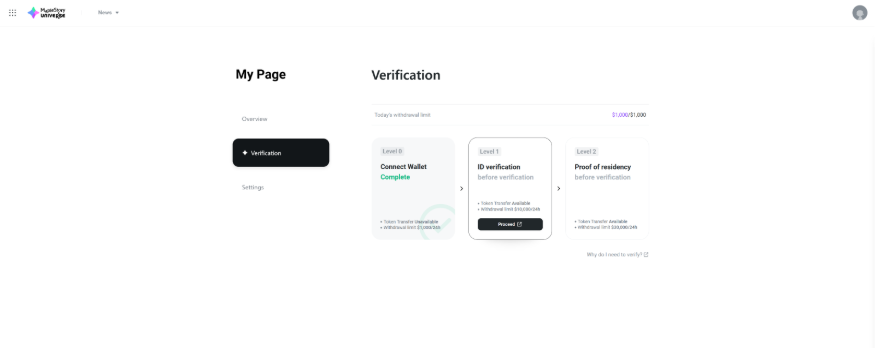
- You can only complete KYC on your mobile device. If you start the process on a PC as described above, a QR code will appear. Scan the QR code with your mobile device to continue the KYC process on mobile.
- KYC is processed through an automated system. However, if your documents require additional review, a manual review will be conducted, which may take additional time.
- Once your KYC verification is complete, you will receive the result via notification on MapleStory Universe Web.
Some IDs require manual review for verification.
IDs requiring manual review will temporarily enter a Pending status, during which a "Waiting for Approval" message will appear on screen.
On average, the Pending status is resolved within 10 minutes, but if extensive manual checks are needed, it may take up to 24 hours for approval or rejection.
If your ID is in a Pending state, please wait until the verification result is determined.
Using passport is recommended for the ID verification.
When your local ID identification fails, please try the procedure with your passport.
When verifying your ID with passport, KYC verification may require the back-side image of your passport.
For the back-side image, please take a photo of the front side; front side of passport contains all the necessary information for ID verification to be completed.
KYC verification may fail if you are located in or using an ID issued from a region subject to regulatory restrictions, including Cuba, Iran, North Korea, Russia, South Korea, Syria, Ukraine, and United States.
Service access may be limited in these areas.
Please make sure your IP address reflects your actual location or submit an ticket for assistance. If the issue persists, please refer to “I Keep Getting Rejected for Verification. What Should I Do?”