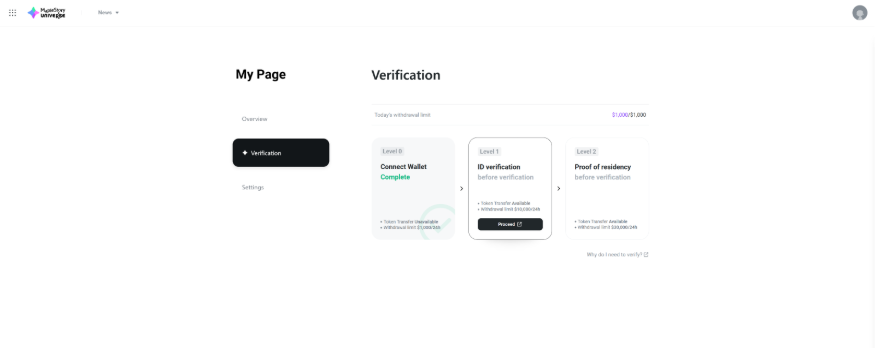
- Go to MapleStory Universe Web and connect your wallet.
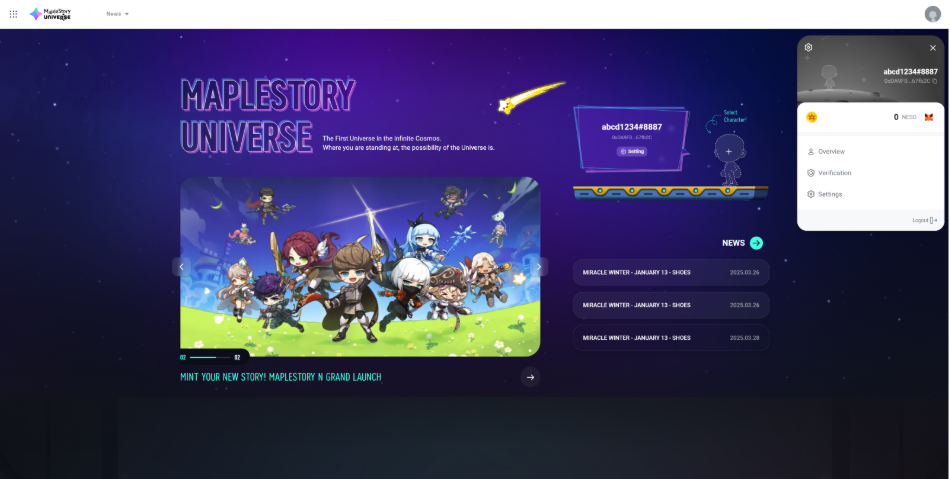
- Click the profile button in the top right corner and select Verification.
- Choose the verification level you want to complete, and you will be redirected to the KYC page.
- You can only complete KYC on your mobile device. If you start the process on a PC as described above, a QR code will appear. Scan the QR code with your mobile device to continue the KYC process on mobile.
- KYC is processed through an automated system. However, if your documents require additional review, a manual review will be conducted, which may take additional time.
- Once your KYC verification is complete, you will receive the result via notification on MapleStory Universe Web.
- Wallet-to-Wallet NFT transfers on Henesys L1
- Builder functions
- Contribution-based Rewards
- DApp monetization
- Full legal name
- Nationality
- Date of Birth
- ID Type
- ID Number
- IP Address
- Any additional data required by the chosen ID type
- Customer address
- IP Address
KYC verification cannot be completed while using network-related services.

MapleStory Universe
If network-related services are running on your mobile device when accessing the KYC verification, the IP address may be blocked from verification for up to 48 hours.
To ensure successful KYC verification on your mobile device, please disable any network-related services before proceeding.
※ The IP address used for KYC verification is determined by the network environment of your mobile device.
My KYC verification has been deactivated.
MapleStory Universe
KYC verification may be deactivated if abnormal verification activity is detected.
If deactivated, future attempts to reverify may result in failure.
Please refer to the following cases specified in our Terms of Use that may apply. [LINK]
How can I complete KYC?
MapleStory Universe
You can complete KYC on the MapleStory Universe web.
What does it mean when my KYC shows "Waiting for Approval"?
MapleStory Universe
Some IDs require manual review for verification.
IDs requiring manual review will temporarily enter a Pending status, during which a "Waiting for Approval" message will appear on screen.
On average, the Pending status is resolved within 10 minutes, but if extensive manual checks are needed, it may take up to 24 hours for approval or rejection.
If your ID is in a Pending state, please wait until the verification result is determined.
My ID image does not pass the verification!
MapleStory Universe
Using passport is recommended for the ID verification.
When your local ID identification fails, please try the procedure with your passport.
When verifying your ID with passport, KYC verification may require the back-side image of your passport.
For the back-side image, please take a photo of the front side; front side of passport contains all the necessary information for ID verification to be completed.
I tried to verify my ID and residence but failed.
MapleStory Universe
KYC verification may fail if you are located in or using an ID issued from a region subject to regulatory restrictions, including Cuba, Iran, North Korea, Russia, South Korea, Syria, Ukraine, and United States.
Service access may be limited in these areas.
Please make sure your IP address reflects your actual location or submit an ticket for assistance. If the issue persists, please refer to “I Keep Getting Rejected for Verification. What Should I Do?”
What does “NFT Transfer Unavailable" at Verification Level 0 mean?
MapleStory Universe
At Level 0, peer-to-peer NFT transfers on Henesys L1 are disabled.
This means you cannot use your wallet’s NFT Transfer function or NFT Transfer within MSU Marketplace.
These restrictions help prevent unverified wallets from transfer digital assets and are intended to reduce the risk of money laundering and other unauthorized activity.
Do I need to complete all Verification Levels to play MapleStory N?
MapleStory Universe
No, Level 0 is sufficient to enjoy MapleStory N.
However, to transfer certain digital assets to other wallet addresses, claim contribution-based rewards, or monetize via DApps, you must complete Level 1 and Level 2 verification.
Why are the NXPC bridge-out & transfer limits different for each Verification Level?
MapleStory Universe
Higher verification levels reflect stronger identity verification, allowing for larger amounts to be processed more safely and securely.
Therefore, Level 1 includes basic limits, while Level 2 unlocks higher threshold based on enhanced user verification.
What are the differences between the Verification Levels?
MapleStory Universe
| Level | Information Collected & Processed | Daily Bridge-Out & Transfer Limit | Unavailable Features | ||
| NXPC Bridge-Out | Wallet-to-Wallet NXPC Transfer | Wallet-to-Wallet NESO Transfer | |||
| Level 0 (Wallet Connection) | None | $1,000 | |||
Level 1 (ID Verification) | $10,000 | None | |||
Level 2 (Proof of Residence) | $30,000 | None | |||